'%3e%3cg%20filter='url(%23filter0_i_679_862)'%3e%3ccircle%20cx='47.3083'%20cy='88.4997'%20r='11.3083'%20fill='url(%23paint0_radial_679_862)'/%3e%3c/g%3e%3ccircle%20cx='50.0719'%20cy='91.9742'%20r='4.025'%20fill='%231B1B1B'/%3e%3cg%20style='mix-blend-mode:color-dodge'%3e%3ccircle%20cx='47.3893'%20cy='90.0612'%20r='1.91667'%20fill='%23D9D9D9'/%3e%3c/g%3e%3c/g%3e%3cg%20clip-path='url(%23clip1_679_862)'%3e%3cg%20filter='url(%23filter1_i_679_862)'%3e%3ccircle%20cx='81.6443'%20cy='88.4997'%20r='11.3083'%20fill='url(%23paint1_radial_679_862)'/%3e%3c/g%3e%3ccircle%20cx='84.4039'%20cy='91.9742'%20r='4.025'%20fill='%231B1B1B'/%3e%3cg%20style='mix-blend-mode:color-dodge'%3e%3ccircle%20cx='81.7214'%20cy='90.0612'%20r='1.91667'%20fill='%23D9D9D9'/%3e%3c/g%3e%3c/g%3e%3cdefs%3e%3cfilter%20id='filter0_i_679_862'%20x='36'%20y='75.1711'%20width='23.6273'%20height='24.6375'%20filterUnits='userSpaceOnUse'%20color-interpolation-filters='sRGB'%3e%3cfeFlood%20flood-opacity='0'%20result='BackgroundImageFix'/%3e%3cfeBlend%20mode='normal'%20in='SourceGraphic'%20in2='BackgroundImageFix'%20result='shape'/%3e%3cfeColorMatrix%20in='SourceAlpha'%20type='matrix'%20values='0%200%200%200%200%200%200%200%200%200%200%200%200%200%200%200%200%200%20127%200'%20result='hardAlpha'/%3e%3cfeOffset%20dx='1.01015'%20dy='-2.02031'/%3e%3cfeGaussianBlur%20stdDeviation='1.01015'/%3e%3cfeComposite%20in2='hardAlpha'%20operator='arithmetic'%20k2='-1'%20k3='1'/%3e%3cfeColorMatrix%20type='matrix'%20values='0%200%200%200%200%200%200%200%200%200%200%200%200%200%200%200%200%200%200.15%200'/%3e%3cfeBlend%20mode='normal'%20in2='shape'%20result='effect1_innerShadow_679_862'/%3e%3c/filter%3e%3cfilter%20id='filter1_i_679_862'%20x='70.3359'%20y='75.1711'%20width='23.6273'%20height='24.6375'%20filterUnits='userSpaceOnUse'%20color-interpolation-filters='sRGB'%3e%3cfeFlood%20flood-opacity='0'%20result='BackgroundImageFix'/%3e%3cfeBlend%20mode='normal'%20in='SourceGraphic'%20in2='BackgroundImageFix'%20result='shape'/%3e%3cfeColorMatrix%20in='SourceAlpha'%20type='matrix'%20values='0%200%200%200%200%200%200%200%200%200%200%200%200%200%200%200%200%200%20127%200'%20result='hardAlpha'/%3e%3cfeOffset%20dx='1.01015'%20dy='-2.02031'/%3e%3cfeGaussianBlur%20stdDeviation='1.01015'/%3e%3cfeComposite%20in2='hardAlpha'%20operator='arithmetic'%20k2='-1'%20k3='1'/%3e%3cfeColorMatrix%20type='matrix'%20values='0%200%200%200%200%200%200%200%200%200%200%200%200%200%200%200%200%200%200.15%200'/%3e%3cfeBlend%20mode='normal'%20in2='shape'%20result='effect1_innerShadow_679_862'/%3e%3c/filter%3e%3cradialGradient%20id='paint0_radial_679_862'%20cx='0'%20cy='0'%20r='1'%20gradientUnits='userSpaceOnUse'%20gradientTransform='translate(47.3083%2088.4997)%20rotate(29.2803)%20scale(11.9552)'%3e%3cstop%20offset='0.634615'%20stop-color='white'/%3e%3cstop%20offset='1'%20stop-color='%23A8FFEA'/%3e%3c/radialGradient%3e%3cradialGradient%20id='paint1_radial_679_862'%20cx='0'%20cy='0'%20r='1'%20gradientUnits='userSpaceOnUse'%20gradientTransform='translate(81.6443%2088.4997)%20rotate(29.2803)%20scale(11.9552)'%3e%3cstop%20offset='0.634615'%20stop-color='white'/%3e%3cstop%20offset='1'%20stop-color='%23A8FFEA'/%3e%3c/radialGradient%3e%3cclipPath%20id='clip0_679_862'%3e%3crect%20width='22.6167'%20height='22.6167'%20fill='white'%20transform='translate(36%2077.1914)'/%3e%3c/clipPath%3e%3cclipPath%20id='clip1_679_862'%3e%3crect%20width='22.6167'%20height='22.6167'%20fill='white'%20transform='translate(70.3359%2077.1914)'/%3e%3c/clipPath%3e%3c/defs%3e%3c/svg%3e)

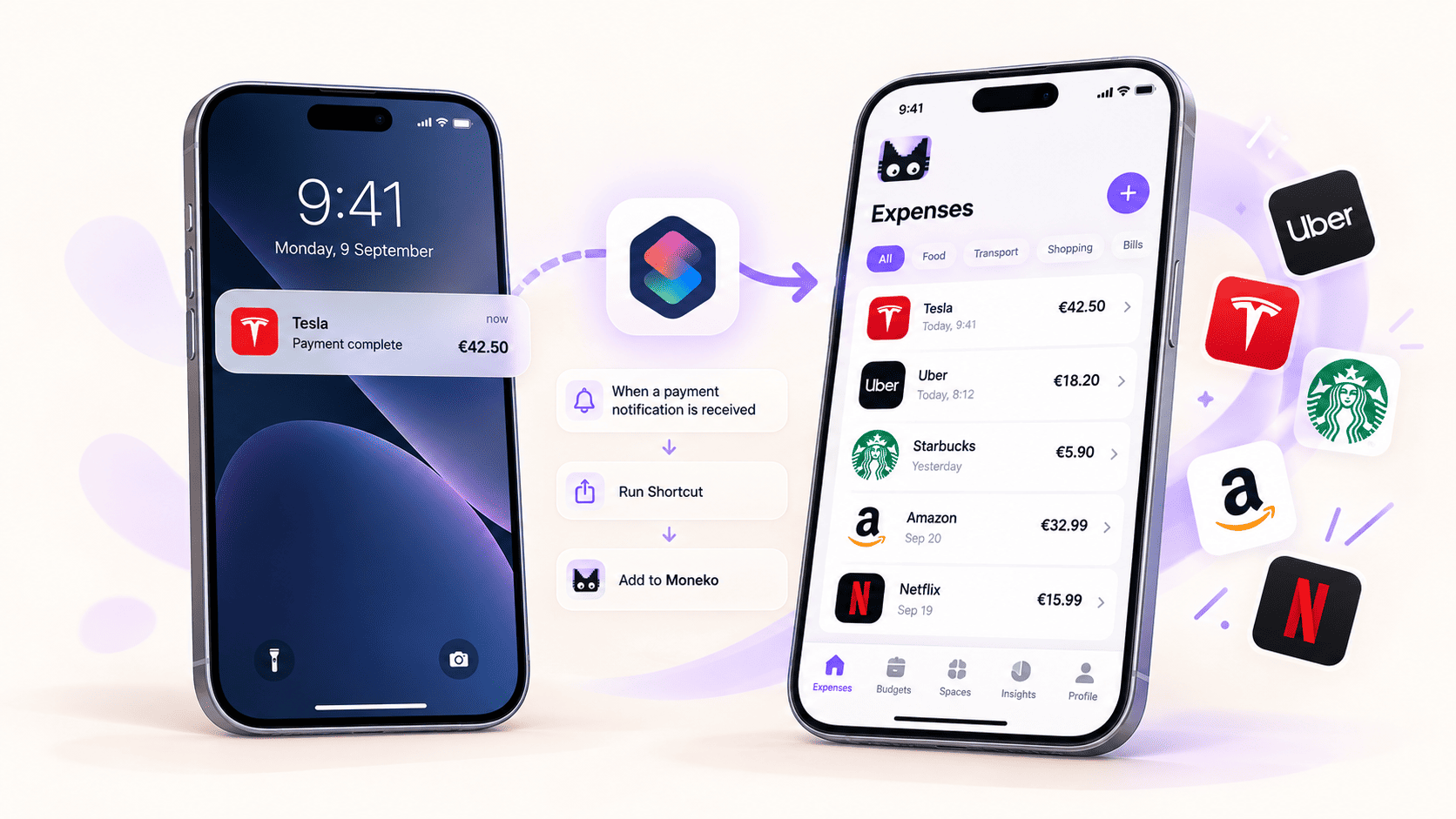
Can you capture transactions from notifications on iPhone?
Yes. Moneko supports transaction capture from selected app notifications on iOS 27 or later. You set up a Notification automation in Apple's Shortcuts app, choose which apps can trigger it, and add Moneko's Capture Transaction Notification action. When a selected app sends an alert, Shortcuts passes its notification details to Moneko to check for a supported completed transaction.
This is iOS notification capture for expense tracking: you decide which apps trigger the automation, and Moneko checks the details before saving a supported transaction.
This gives iPhone users another way to record spending without typing every purchase. It is an iOS notification expense tracking workflow configured by you: Moneko does not read every notification on your phone or connect directly to your bank.
For the complete setup, see how to capture transactions from iPhone notifications on iOS 27. The guide walks through choosing apps, mapping notification fields, setting a destination Space and Wallet, and testing the automation.
How iOS 27 notification capture works
The automation connects three pieces: a notification from an app you select, Apple's Shortcuts Notification trigger, and Moneko's capture action. The selected notification's title, subtitle, message, and source app can be passed to the action when the automation runs.
Moneko checks those details before saving anything. It can create a transaction when a notification contains enough evidence of a supported completed financial event. An unclear alert, promotion, pending or declined payment, internal transfer, or credit-card balance payment may be ignored. A notification does not automatically become an expense just because it mentions money.
This is different from bank syncing. Moneko does not sign in to your financial institution for this capture path, and it only receives the notification details passed by the automation you configured. The notification must include useful information; Shortcuts cannot supply a merchant or amount that the source app did not include.
For best results, choose apps that show the merchant or payment source, amount, currency, and a clear completed status in their notifications. Coverage depends on what each app displays and can change if its notification format changes. The automation handles new notifications that meet its trigger; it does not import a bank's full transaction history or recover purchases that never generated a useful alert.
Notification capture, Apple Pay Shortcuts, and bank sync
These are different ways to add financial activity to a budget:
| Capture method | What it uses | Useful to know |
|---|---|---|
| iOS 27 notification capture | Details from notifications sent by apps you select in Shortcuts | Requires a supported completed-transaction notification; it is not full bank history. |
| Apple Pay Wallet Shortcut | The Wallet transaction trigger for eligible Apple Pay purchases | This is separate from the Notification trigger. See the Apple Pay Shortcut guide. |
| Bank sync | A supported financial institution connection | This is a separate feature and is not required for notification capture. |
| Manual and receipt capture | Text, voice, receipt photos, or chat | Useful for cash, purchases without a helpful notification, and other spending. |
Set up an iPhone notification expense tracker
To get started, update Moneko and open Settings → Apple Pay Integration. The iPhone integration screen also contains the settings used for notification capture. Turn on Apple Pay Sync, choose the destination Space and Wallet, and tap Start Setup.
Then open Apple's Shortcuts app and create a personal automation using the Notification trigger. Choose the bank, card, or payment apps whose alerts you want to use. Add Moneko's Capture Transaction Notification action and pass the notification's Title, Subtitle, Body, and App values into the matching Moneko fields. Check the destination Space and Wallet before saving.
The setup requires an iPhone running iOS 27 or later, the Moneko version that includes this action, and Moneko Plus. Availability also depends on the selected app sending a useful notification and the automation being configured correctly.
Follow the step-by-step iPhone notification capture setup guide.
Do you need Shortcuts to track expenses on iPhone?
Shortcuts is required for Moneko's iOS 27 notification automation and its separate Apple Pay Wallet transaction trigger. You do not need either automation to use Moneko: you can still add spending with text, voice, receipt photos, or chat.
Apple Pay capture and notification capture are two distinct methods. The Wallet transaction trigger is for eligible Apple Pay purchases. The Notification trigger can pass details from selected apps, such as a bank or payment app. If you want to capture payment alerts from other apps, use the iPhone notification setup guide, rather than the Wallet transaction trigger instructions.
Does Moneko automatically track expenses on iPhone?
Moneko can reduce manual expense entry on iPhone by capturing supported completed transactions from selected notifications through Shortcuts on iOS 27 or later. It does not track every purchase automatically: the source app must send a useful notification, you must select that app in the automation, and Moneko must be able to identify a supported completed transaction.
This is one capture option alongside Apple Pay Wallet Shortcuts, text, voice, receipt photos, and chat. It is not a replacement for a complete account history or bank connection. For Android notification capture, see Moneko's Android notification tracking guide.
Frequently asked questions
Can Moneko capture transactions from iOS notifications?
Yes. On iOS 27 or later, configure a Shortcuts Notification automation for apps you select and add Moneko's Capture Transaction Notification action. Moneko saves supported completed transactions when the selected notification contains enough information.
Does Moneko read all notifications on my iPhone?
No. You choose the apps in the Shortcuts automation. Moneko receives only the notification details passed to its action when that automation runs.
Does iPhone notification capture connect to my bank?
No. Notification capture processes details from a selected app notification. It does not require Moneko to sign in to your bank or provide direct bank access.
Will every payment notification be saved?
No. Moneko checks whether the notification describes a supported completed transaction. It may ignore pending, declined, promotional, duplicate, unclear, or otherwise unsupported alerts.
Can I use notification capture without Apple Pay?
Yes. The iOS 27 Notification automation is separate from the Apple Pay Wallet transaction trigger. You can select supported bank or payment apps whose notifications you want to send to Moneko.
Is this available on Android too?
Moneko also supports notification capture on Android, with its own Android setup and notification-access permission. The iPhone workflow uses Shortcuts on iOS 27 or later.
