'%3e%3cg%20filter='url(%23filter0_i_679_862)'%3e%3ccircle%20cx='47.3083'%20cy='88.4997'%20r='11.3083'%20fill='url(%23paint0_radial_679_862)'/%3e%3c/g%3e%3ccircle%20cx='50.0719'%20cy='91.9742'%20r='4.025'%20fill='%231B1B1B'/%3e%3cg%20style='mix-blend-mode:color-dodge'%3e%3ccircle%20cx='47.3893'%20cy='90.0612'%20r='1.91667'%20fill='%23D9D9D9'/%3e%3c/g%3e%3c/g%3e%3cg%20clip-path='url(%23clip1_679_862)'%3e%3cg%20filter='url(%23filter1_i_679_862)'%3e%3ccircle%20cx='81.6443'%20cy='88.4997'%20r='11.3083'%20fill='url(%23paint1_radial_679_862)'/%3e%3c/g%3e%3ccircle%20cx='84.4039'%20cy='91.9742'%20r='4.025'%20fill='%231B1B1B'/%3e%3cg%20style='mix-blend-mode:color-dodge'%3e%3ccircle%20cx='81.7214'%20cy='90.0612'%20r='1.91667'%20fill='%23D9D9D9'/%3e%3c/g%3e%3c/g%3e%3cdefs%3e%3cfilter%20id='filter0_i_679_862'%20x='36'%20y='75.1711'%20width='23.6273'%20height='24.6375'%20filterUnits='userSpaceOnUse'%20color-interpolation-filters='sRGB'%3e%3cfeFlood%20flood-opacity='0'%20result='BackgroundImageFix'/%3e%3cfeBlend%20mode='normal'%20in='SourceGraphic'%20in2='BackgroundImageFix'%20result='shape'/%3e%3cfeColorMatrix%20in='SourceAlpha'%20type='matrix'%20values='0%200%200%200%200%200%200%200%200%200%200%200%200%200%200%200%200%200%20127%200'%20result='hardAlpha'/%3e%3cfeOffset%20dx='1.01015'%20dy='-2.02031'/%3e%3cfeGaussianBlur%20stdDeviation='1.01015'/%3e%3cfeComposite%20in2='hardAlpha'%20operator='arithmetic'%20k2='-1'%20k3='1'/%3e%3cfeColorMatrix%20type='matrix'%20values='0%200%200%200%200%200%200%200%200%200%200%200%200%200%200%200%200%200%200.15%200'/%3e%3cfeBlend%20mode='normal'%20in2='shape'%20result='effect1_innerShadow_679_862'/%3e%3c/filter%3e%3cfilter%20id='filter1_i_679_862'%20x='70.3359'%20y='75.1711'%20width='23.6273'%20height='24.6375'%20filterUnits='userSpaceOnUse'%20color-interpolation-filters='sRGB'%3e%3cfeFlood%20flood-opacity='0'%20result='BackgroundImageFix'/%3e%3cfeBlend%20mode='normal'%20in='SourceGraphic'%20in2='BackgroundImageFix'%20result='shape'/%3e%3cfeColorMatrix%20in='SourceAlpha'%20type='matrix'%20values='0%200%200%200%200%200%200%200%200%200%200%200%200%200%200%200%200%200%20127%200'%20result='hardAlpha'/%3e%3cfeOffset%20dx='1.01015'%20dy='-2.02031'/%3e%3cfeGaussianBlur%20stdDeviation='1.01015'/%3e%3cfeComposite%20in2='hardAlpha'%20operator='arithmetic'%20k2='-1'%20k3='1'/%3e%3cfeColorMatrix%20type='matrix'%20values='0%200%200%200%200%200%200%200%200%200%200%200%200%200%200%200%200%200%200.15%200'/%3e%3cfeBlend%20mode='normal'%20in2='shape'%20result='effect1_innerShadow_679_862'/%3e%3c/filter%3e%3cradialGradient%20id='paint0_radial_679_862'%20cx='0'%20cy='0'%20r='1'%20gradientUnits='userSpaceOnUse'%20gradientTransform='translate(47.3083%2088.4997)%20rotate(29.2803)%20scale(11.9552)'%3e%3cstop%20offset='0.634615'%20stop-color='white'/%3e%3cstop%20offset='1'%20stop-color='%23A8FFEA'/%3e%3c/radialGradient%3e%3cradialGradient%20id='paint1_radial_679_862'%20cx='0'%20cy='0'%20r='1'%20gradientUnits='userSpaceOnUse'%20gradientTransform='translate(81.6443%2088.4997)%20rotate(29.2803)%20scale(11.9552)'%3e%3cstop%20offset='0.634615'%20stop-color='white'/%3e%3cstop%20offset='1'%20stop-color='%23A8FFEA'/%3e%3c/radialGradient%3e%3cclipPath%20id='clip0_679_862'%3e%3crect%20width='22.6167'%20height='22.6167'%20fill='white'%20transform='translate(36%2077.1914)'/%3e%3c/clipPath%3e%3cclipPath%20id='clip1_679_862'%3e%3crect%20width='22.6167'%20height='22.6167'%20fill='white'%20transform='translate(70.3359%2077.1914)'/%3e%3c/clipPath%3e%3c/defs%3e%3c/svg%3e)

If you struggle to keep an expense tracker updated, the problem might not be budgeting. The problem might be how much work goes into recording every purchase. You buy coffee, order an Uber, pick up groceries, and tell yourself you'll add everything later. A few days pass, and your budget no longer matches what you've spent.
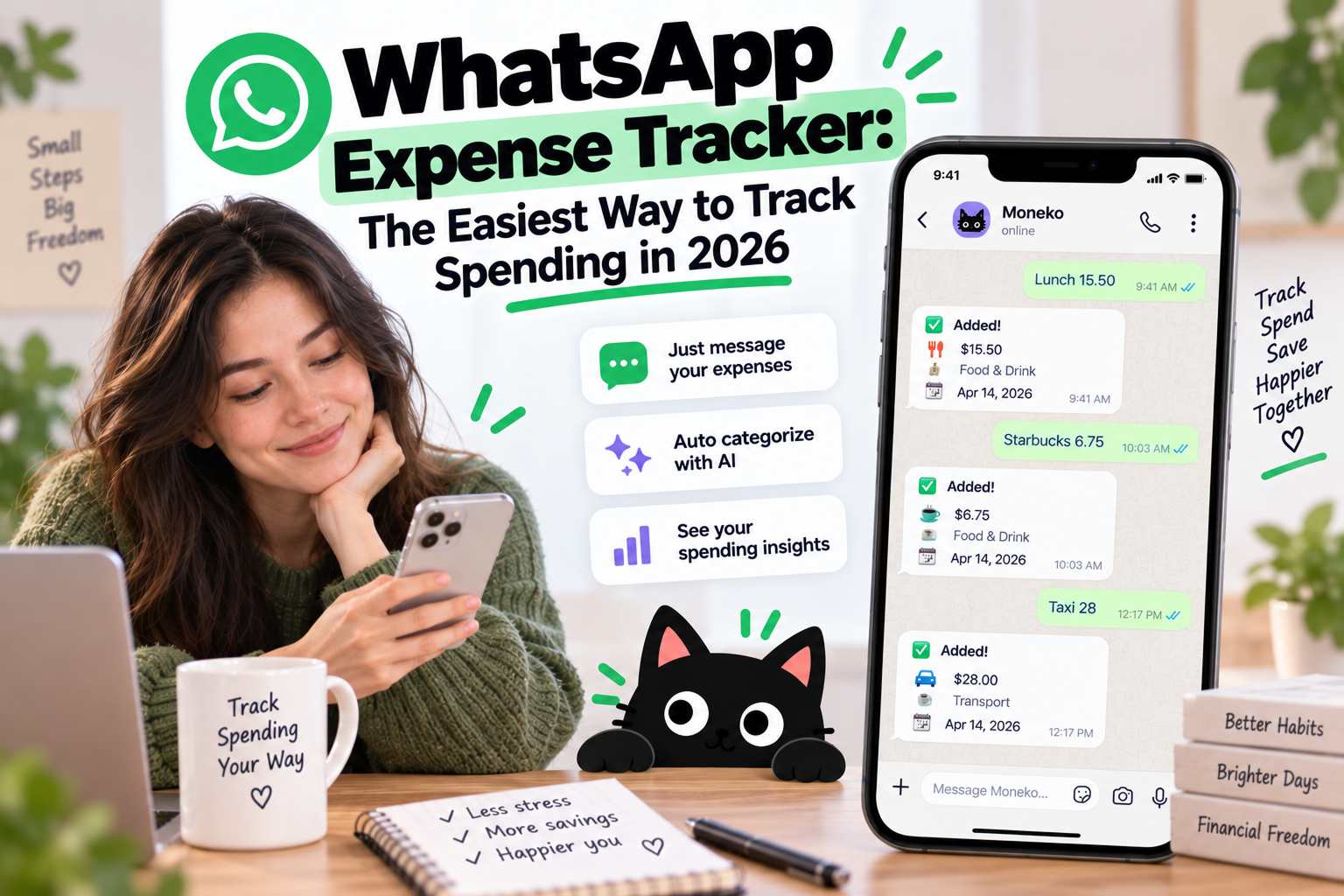
A WhatsApp expense tracker removes much of this friction. Instead of opening another app and filling out a transaction form, you send a message such as "Coffee $5" or "Groceries $82." AI expense trackers interpret the message, organize the purchase, and add the transaction to your spending history.
What Is a WhatsApp Expense Tracker?
A WhatsApp expense tracker records purchases from messages you send through WhatsApp. Instead of opening a budgeting app every time you spend money, you record the expense in a chat you're already using throughout the day.
For example:
Coffee $5
Groceries $82
Uber $24 airport
Dinner $68 split with Alex
AI-based trackers understand natural language, so you don't need to memorize commands or follow a strict format. Some services also process receipt photos and voice notes, giving you several quick ways to record spending.
WhatsApp isn't meant to replace your entire financial dashboard. The better approach is to use WhatsApp for fast expense capture while a budgeting app organizes categories, budgets, recurring expenses, and spending insights afterward.
How Does an AI WhatsApp Expense Tracker Work?
Older expense bots often require structured commands such as:
/expense 25 food
AI makes expense entry more conversational. Instead of learning commands, you describe what happened.
Send:
Dinner $46 with Sarah
The tracker identifies the amount and description, then assigns the purchase to a likely category such as dining.
Send:
$78 groceries at Costco
AI identifies $78 as the amount, Costco as the merchant, and groceries as the likely category.
Some AI expense trackers also process receipt photos and voice notes. This means recording a purchase feels closer to sending a message than maintaining a financial database.
How to Track Expenses Through WhatsApp With Moneko AI
Moneko connects WhatsApp expense tracking to a broader budgeting system. Instead of treating WhatsApp as your entire financial tracker, Moneko uses messaging as one of several ways to record spending.
You might send:
Groceries $94
Moneko organizes the purchase with your grocery spending and updates your budget.
Or:
Dinner $72 split with Alex
Now the transaction becomes part of your shared expenses as well as your spending history.
You also have other ways to record purchases, including Telegram, voice, receipt photos, spending notifications, and the Moneko app. AI handles much of the categorization afterward, reducing the amount of manual organization required to keep your budget current.
The important difference is what happens after you send the message. Your WhatsApp expenses don't stay inside a standalone chat log. They become part of your budgets, recurring expenses, Shared Spaces, bill splits, and spending insights.
WhatsApp Expense Tracking for Couples and Families
Managing your own spending is one thing. Managing money with another person gets complicated quickly.
Your partner spends $110 on groceries. You pay the $75 internet bill. Rent comes from another account. One person covers dinner, while several household subscriptions renew throughout the month.
A basic WhatsApp expense bot records those transactions. Couples and families still need to understand how everything fits together.
Moneko connects WhatsApp expense capture with Shared Spaces, shared budgets, recurring expenses, and bill splitting. Record "Groceries $110," and the purchase becomes part of your household spending rather than another transaction someone needs to organize later.
For couples, families, and roommates who manage expenses together every month, this gives WhatsApp expense tracking more value than a simple spending log.
Track Expenses With Text, Receipts, or Voice
Typing isn't always the easiest way to record a purchase. WhatsApp already supports photos and voice messages, which makes both useful for expense tracking.
After grocery shopping, photograph the receipt instead of entering every detail yourself. An AI expense tracker reads information such as the merchant and total before organizing the purchase.
Voice works similarly. Send:
"Spent $86 on groceries at Costco."
The message becomes a transaction without requiring you to type the amount, merchant, and category separately.
Giving people several input methods matters because the easiest option changes with the situation. Text works for coffee. A receipt photo works after a grocery run. Voice works when your hands are full.
WhatsApp Expense Tracker vs. Traditional Budgeting App
| Feature | Traditional Budget App | WhatsApp Expense Tracker |
|---|---|---|
| Expense entry | Open app and enter transaction | Send a message |
| Natural language | Depends on app | Common with AI trackers |
| Voice logging | Depends on app | Available with some trackers |
| Receipt photos | Often available | Available with some trackers |
| Monthly budgeting | Strong | Often limited |
| Financial reports | Strong | Often limited |
| Shared finances | Depends on app | Often limited |
| Recurring expenses | Common | Depends on tracker |
The two approaches solve different parts of the problem. WhatsApp is useful for recording spending quickly, while a dedicated budgeting interface is better for reviewing categories, setting budgets, managing recurring expenses, and understanding spending patterns.
Moneko combines both workflows. WhatsApp handles fast expense capture, while the main app handles broader budgeting and shared financial management.
Why Use WhatsApp Instead of Entering Expenses Manually?
Traditional manual expense tracking often looks like this:
Purchase → remember later → open budgeting app → add transaction → select category → save
WhatsApp shortens the process:
Purchase → send "Lunch $16"
The difference looks small, but repeated across dozens of transactions every month, fewer steps make expense tracking easier to maintain.
This matters most for people who repeatedly start budgeting and then fall behind. A detailed budgeting system has little value once half of your purchases are missing.
Do You Need to Connect Your Bank?
No. A WhatsApp expense tracker also works as a manual tracking system, which makes it useful for people who don't want to connect financial accounts.
Manual tracking also covers purchases that bank syncing doesn't always handle well, including cash expenses. You decide what gets recorded and how you describe each purchase.
The trade-off is simple. If you don't record an expense, the tracker won't know the purchase happened.
Some budgeting platforms support both approaches. Moneko combines manual expense capture through WhatsApp, Telegram, receipts, voice, and notifications with supported bank syncing, giving users more than one way to keep spending records current.
Is WhatsApp Good for Budgeting?
WhatsApp works well for recording expenses. Managing an entire monthly budget through a long chat history is less practical.
Suppose you record 80 purchases during the month. Scrolling through 80 WhatsApp messages won't quickly tell you whether grocery spending increased, which subscriptions renewed, or how your household budget is doing.
A stronger setup separates expense capture from financial management.
WhatsApp handles quick entries, receipt photos, voice notes, and purchases you want to record immediately. Your budgeting app handles categories, monthly budgets, recurring expenses, shared household spending, reports, and financial insights.
This is also why a WhatsApp integration becomes more useful when connected to a full budgeting platform rather than operating as a standalone expense bot.
Who Should Use a WhatsApp Expense Tracker?
A WhatsApp expense tracker makes the most sense if you:
- Frequently forget to record purchases
- Already use WhatsApp throughout the day
- Prefer manual tracking without connecting your bank
- Want faster expense entry
- Like recording purchases through voice or receipts
- Share expenses with a partner or household
- Want AI to organize spending afterward
If you already keep your budgeting app perfectly updated through bank syncing or regular manual entry, WhatsApp adds less value. The main advantage is reducing the effort required to record spending consistently.
Frequently Asked Questions
What is a WhatsApp expense tracker?
A WhatsApp expense tracker records purchases from messages sent through WhatsApp. You might send "Lunch $15," and an AI-based service interprets the amount and description before adding the purchase to your spending history.
How do I track expenses on WhatsApp?
Connect WhatsApp to a supported expense tracker or budgeting service, then record purchases as messages. Depending on the service, you might type "Groceries $65," send a voice note, or photograph a receipt.
Is there an AI expense tracker for WhatsApp?
Yes. AI-based WhatsApp expense trackers understand natural-language messages rather than requiring fixed commands. Some also support receipt photos, voice notes, automatic categorization, budgeting, and spending summaries.
What is the best WhatsApp expense tracker?
The best option depends on what you need after recording the purchase. A simple WhatsApp expense bot works if you only need a transaction log. Moneko fits people who also want budgets, recurring expenses, bill splitting, Shared Spaces, and spending insights connected to those transactions.
Does WhatsApp expense tracking work for couples?
Yes. Couples use WhatsApp to record shared purchases such as groceries, restaurants, utilities, and household expenses. A shared budgeting platform such as Moneko also connects those purchases with household budgets and bill splitting.
Does a WhatsApp expense tracker require bank access?
No. Manual WhatsApp expense tracking works without connecting your bank account. Some services also offer bank syncing for people who prefer more automated transaction tracking.
Does WhatsApp expense tracking support receipts?
Some AI expense trackers process receipt photos sent through WhatsApp. Instead of manually entering the merchant, amount, and category, you photograph the receipt and let the service extract the transaction information.
Does WhatsApp expense tracking support voice messages?
Some AI-based trackers support voice expense entry. You send a message such as "Spent $45 on dinner," and the service turns the voice note into a transaction.
A Simpler Way to Keep Your Budget Updated
The hardest part of expense tracking often isn't creating a budget. It's keeping the information current after everyday life gets busy.
WhatsApp reduces the distance between spending and recording. Send "Coffee $5," photograph your grocery receipt, or leave a voice note while the purchase is still fresh in your mind.
Moneko extends the workflow beyond expense logging. WhatsApp and Telegram handle quick capture, while AI categorization, Pockets, Shared Spaces, recurring expenses, bill splitting, and spending insights organize what happens next.
The best expense tracker is the one you keep using. If opening a separate budgeting app after every purchase is where your habit falls apart, moving expense entry into WhatsApp is a practical place to start.
