'%3e%3cg%20filter='url(%23filter0_i_679_862)'%3e%3ccircle%20cx='47.3083'%20cy='88.4997'%20r='11.3083'%20fill='url(%23paint0_radial_679_862)'/%3e%3c/g%3e%3ccircle%20cx='50.0719'%20cy='91.9742'%20r='4.025'%20fill='%231B1B1B'/%3e%3cg%20style='mix-blend-mode:color-dodge'%3e%3ccircle%20cx='47.3893'%20cy='90.0612'%20r='1.91667'%20fill='%23D9D9D9'/%3e%3c/g%3e%3c/g%3e%3cg%20clip-path='url(%23clip1_679_862)'%3e%3cg%20filter='url(%23filter1_i_679_862)'%3e%3ccircle%20cx='81.6443'%20cy='88.4997'%20r='11.3083'%20fill='url(%23paint1_radial_679_862)'/%3e%3c/g%3e%3ccircle%20cx='84.4039'%20cy='91.9742'%20r='4.025'%20fill='%231B1B1B'/%3e%3cg%20style='mix-blend-mode:color-dodge'%3e%3ccircle%20cx='81.7214'%20cy='90.0612'%20r='1.91667'%20fill='%23D9D9D9'/%3e%3c/g%3e%3c/g%3e%3cdefs%3e%3cfilter%20id='filter0_i_679_862'%20x='36'%20y='75.1711'%20width='23.6273'%20height='24.6375'%20filterUnits='userSpaceOnUse'%20color-interpolation-filters='sRGB'%3e%3cfeFlood%20flood-opacity='0'%20result='BackgroundImageFix'/%3e%3cfeBlend%20mode='normal'%20in='SourceGraphic'%20in2='BackgroundImageFix'%20result='shape'/%3e%3cfeColorMatrix%20in='SourceAlpha'%20type='matrix'%20values='0%200%200%200%200%200%200%200%200%200%200%200%200%200%200%200%200%200%20127%200'%20result='hardAlpha'/%3e%3cfeOffset%20dx='1.01015'%20dy='-2.02031'/%3e%3cfeGaussianBlur%20stdDeviation='1.01015'/%3e%3cfeComposite%20in2='hardAlpha'%20operator='arithmetic'%20k2='-1'%20k3='1'/%3e%3cfeColorMatrix%20type='matrix'%20values='0%200%200%200%200%200%200%200%200%200%200%200%200%200%200%200%200%200%200.15%200'/%3e%3cfeBlend%20mode='normal'%20in2='shape'%20result='effect1_innerShadow_679_862'/%3e%3c/filter%3e%3cfilter%20id='filter1_i_679_862'%20x='70.3359'%20y='75.1711'%20width='23.6273'%20height='24.6375'%20filterUnits='userSpaceOnUse'%20color-interpolation-filters='sRGB'%3e%3cfeFlood%20flood-opacity='0'%20result='BackgroundImageFix'/%3e%3cfeBlend%20mode='normal'%20in='SourceGraphic'%20in2='BackgroundImageFix'%20result='shape'/%3e%3cfeColorMatrix%20in='SourceAlpha'%20type='matrix'%20values='0%200%200%200%200%200%200%200%200%200%200%200%200%200%200%200%200%200%20127%200'%20result='hardAlpha'/%3e%3cfeOffset%20dx='1.01015'%20dy='-2.02031'/%3e%3cfeGaussianBlur%20stdDeviation='1.01015'/%3e%3cfeComposite%20in2='hardAlpha'%20operator='arithmetic'%20k2='-1'%20k3='1'/%3e%3cfeColorMatrix%20type='matrix'%20values='0%200%200%200%200%200%200%200%200%200%200%200%200%200%200%200%200%200%200.15%200'/%3e%3cfeBlend%20mode='normal'%20in2='shape'%20result='effect1_innerShadow_679_862'/%3e%3c/filter%3e%3cradialGradient%20id='paint0_radial_679_862'%20cx='0'%20cy='0'%20r='1'%20gradientUnits='userSpaceOnUse'%20gradientTransform='translate(47.3083%2088.4997)%20rotate(29.2803)%20scale(11.9552)'%3e%3cstop%20offset='0.634615'%20stop-color='white'/%3e%3cstop%20offset='1'%20stop-color='%23A8FFEA'/%3e%3c/radialGradient%3e%3cradialGradient%20id='paint1_radial_679_862'%20cx='0'%20cy='0'%20r='1'%20gradientUnits='userSpaceOnUse'%20gradientTransform='translate(81.6443%2088.4997)%20rotate(29.2803)%20scale(11.9552)'%3e%3cstop%20offset='0.634615'%20stop-color='white'/%3e%3cstop%20offset='1'%20stop-color='%23A8FFEA'/%3e%3c/radialGradient%3e%3cclipPath%20id='clip0_679_862'%3e%3crect%20width='22.6167'%20height='22.6167'%20fill='white'%20transform='translate(36%2077.1914)'/%3e%3c/clipPath%3e%3cclipPath%20id='clip1_679_862'%3e%3crect%20width='22.6167'%20height='22.6167'%20fill='white'%20transform='translate(70.3359%2077.1914)'/%3e%3c/clipPath%3e%3c/defs%3e%3c/svg%3e)
How to Set Up Recurring Expenses and Income in Moneko
Learn how to set up recurring expenses and income in Moneko, automate regular transactions, update budgets, use reminders, and edit recurring items anytime.
How to Set Up Recurring Expenses and Income in Moneko
Recurring lets you automate expenses and income that happen regularly.
You do not need to remember or re-enter the same transaction every time. Set it once, and Moneko logs it automatically on schedule.
What You Can Set as Recurring
You can use recurring for regular expenses, regular income, and repeated money movement. Common examples include:
- rent
- utilities
- subscriptions
- gym memberships
- loan or debt payments
- salary or freelance income
- transfers or allowances
Anything that repeats can be automated.
How to Set Up a Recurring Item
To create a recurring item:
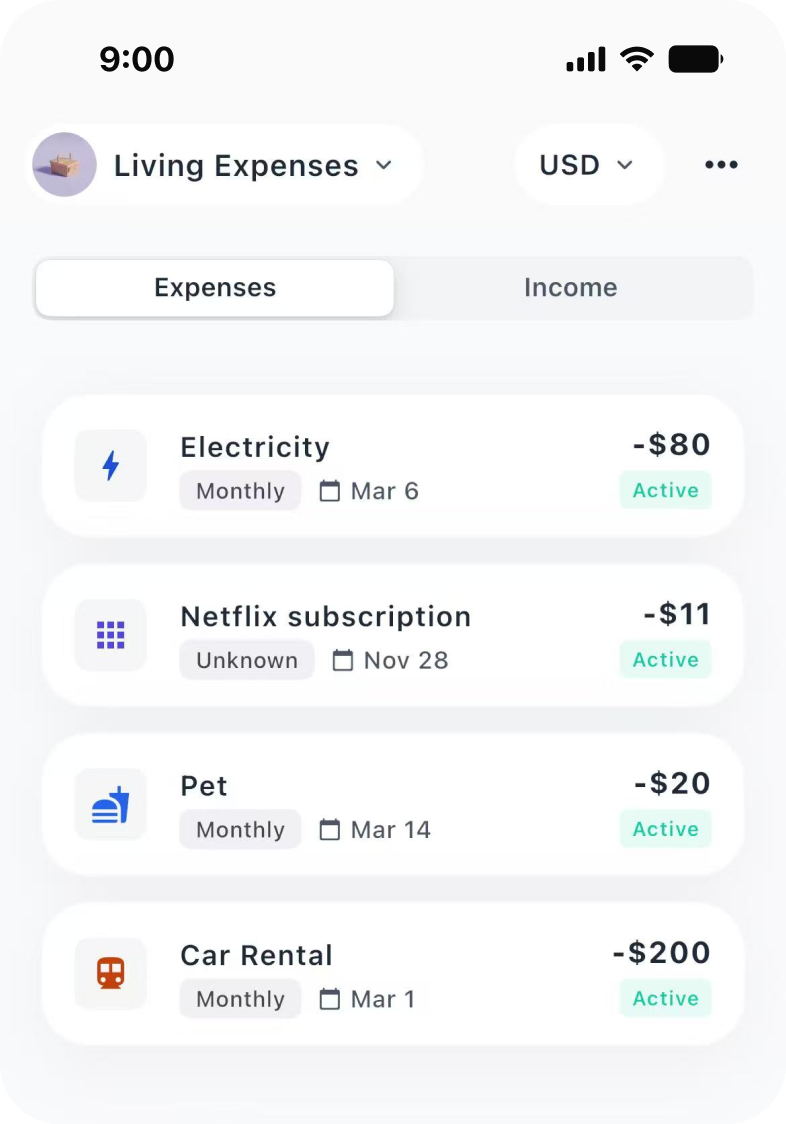
- Go to the Recurring tab.
- Tap the + button.
- Choose Expense or Income.
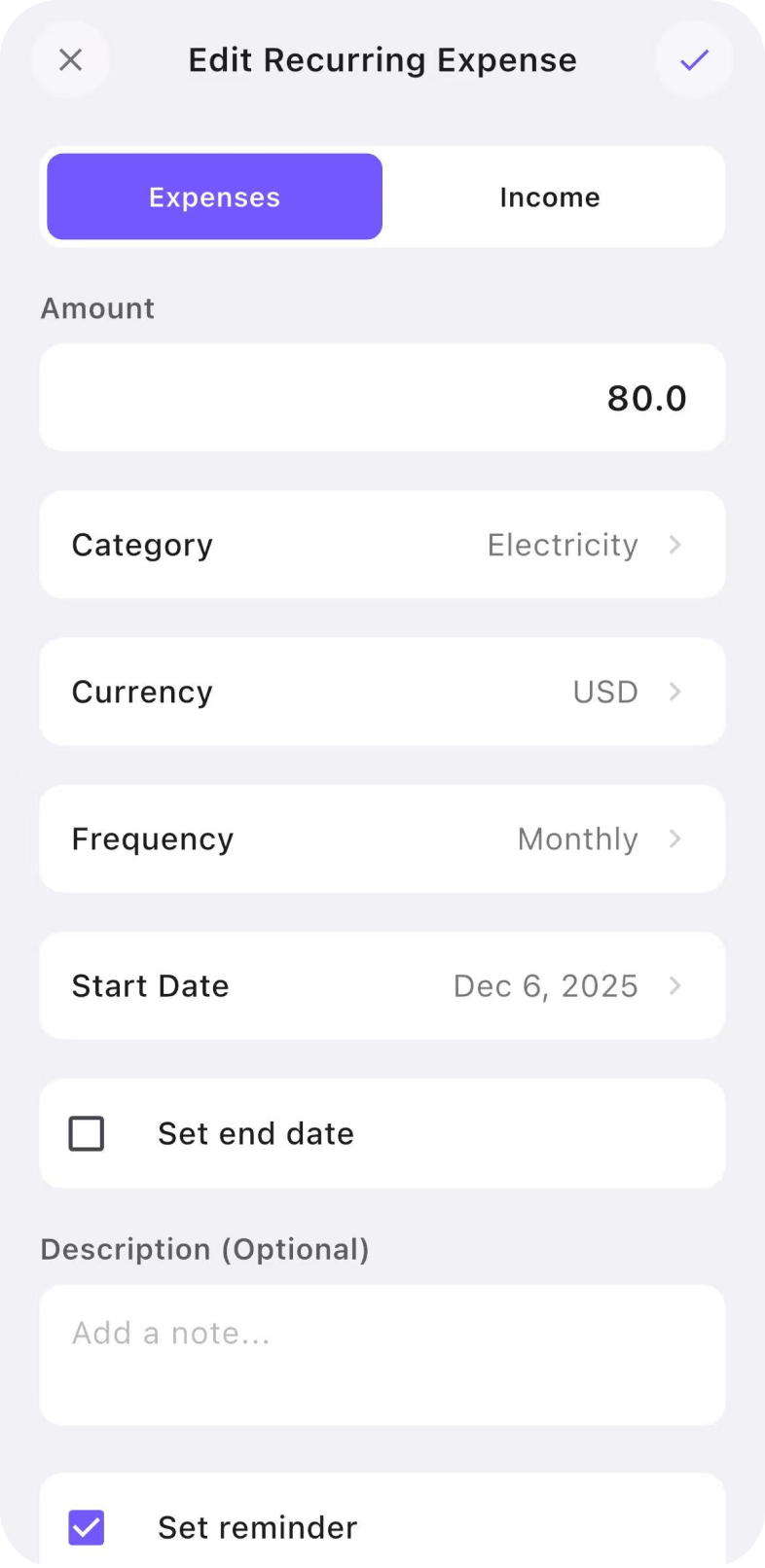
- Enter the details.
- Set the frequency and start date.
- Turn on reminder if needed.
- Tap Save.
Expected Result
Your recurring item is saved and will be logged automatically based on the schedule you set.
How Recurring Works
When a recurring item is active, Moneko handles it for you. Moneko will:
- log it automatically on schedule
- update your budgets
- include it in summaries
- include it in projections
You do not need to log the same transaction again manually.
Why Use Recurring Expenses?
Recurring expenses help you stay on top of fixed spending. Use recurring expenses for payments that repeat, such as rent, utilities, and subscriptions.
This helps you:
- see how much money is already committed
- avoid forgetting regular payments
- understand how much you can still spend
Why Use Recurring Income?
Recurring income helps make your cash flow more predictable. Use recurring income for money that comes in regularly, such as salary, freelance income, or allowances.
When regular income is included, Moneko can give you a clearer view of your monthly money flow.
How to Edit or Update a Recurring Item
You can update a recurring item anytime. To edit:
- Open the Recurring tab.
- Tap an item.
- Update the details.
- Save changes.
Troubleshooting Common Issues
My Recurring Item Did Not Log
Check whether the item is active, the frequency is set correctly, and the start date is correct.
My Budget Looks Different After Adding Recurring
This is expected. Recurring items update your budgets automatically when they are logged.
I Need a Reminder
When setting up or editing a recurring item, turn on reminder if needed.
Frequently Asked Questions
Recurring expenses and income are transactions that repeat regularly and can be logged automatically by Moneko.