'%3e%3cg%20filter='url(%23filter0_i_679_862)'%3e%3ccircle%20cx='47.3083'%20cy='88.4997'%20r='11.3083'%20fill='url(%23paint0_radial_679_862)'/%3e%3c/g%3e%3ccircle%20cx='50.0719'%20cy='91.9742'%20r='4.025'%20fill='%231B1B1B'/%3e%3cg%20style='mix-blend-mode:color-dodge'%3e%3ccircle%20cx='47.3893'%20cy='90.0612'%20r='1.91667'%20fill='%23D9D9D9'/%3e%3c/g%3e%3c/g%3e%3cg%20clip-path='url(%23clip1_679_862)'%3e%3cg%20filter='url(%23filter1_i_679_862)'%3e%3ccircle%20cx='81.6443'%20cy='88.4997'%20r='11.3083'%20fill='url(%23paint1_radial_679_862)'/%3e%3c/g%3e%3ccircle%20cx='84.4039'%20cy='91.9742'%20r='4.025'%20fill='%231B1B1B'/%3e%3cg%20style='mix-blend-mode:color-dodge'%3e%3ccircle%20cx='81.7214'%20cy='90.0612'%20r='1.91667'%20fill='%23D9D9D9'/%3e%3c/g%3e%3c/g%3e%3cdefs%3e%3cfilter%20id='filter0_i_679_862'%20x='36'%20y='75.1711'%20width='23.6273'%20height='24.6375'%20filterUnits='userSpaceOnUse'%20color-interpolation-filters='sRGB'%3e%3cfeFlood%20flood-opacity='0'%20result='BackgroundImageFix'/%3e%3cfeBlend%20mode='normal'%20in='SourceGraphic'%20in2='BackgroundImageFix'%20result='shape'/%3e%3cfeColorMatrix%20in='SourceAlpha'%20type='matrix'%20values='0%200%200%200%200%200%200%200%200%200%200%200%200%200%200%200%200%200%20127%200'%20result='hardAlpha'/%3e%3cfeOffset%20dx='1.01015'%20dy='-2.02031'/%3e%3cfeGaussianBlur%20stdDeviation='1.01015'/%3e%3cfeComposite%20in2='hardAlpha'%20operator='arithmetic'%20k2='-1'%20k3='1'/%3e%3cfeColorMatrix%20type='matrix'%20values='0%200%200%200%200%200%200%200%200%200%200%200%200%200%200%200%200%200%200.15%200'/%3e%3cfeBlend%20mode='normal'%20in2='shape'%20result='effect1_innerShadow_679_862'/%3e%3c/filter%3e%3cfilter%20id='filter1_i_679_862'%20x='70.3359'%20y='75.1711'%20width='23.6273'%20height='24.6375'%20filterUnits='userSpaceOnUse'%20color-interpolation-filters='sRGB'%3e%3cfeFlood%20flood-opacity='0'%20result='BackgroundImageFix'/%3e%3cfeBlend%20mode='normal'%20in='SourceGraphic'%20in2='BackgroundImageFix'%20result='shape'/%3e%3cfeColorMatrix%20in='SourceAlpha'%20type='matrix'%20values='0%200%200%200%200%200%200%200%200%200%200%200%200%200%200%200%200%200%20127%200'%20result='hardAlpha'/%3e%3cfeOffset%20dx='1.01015'%20dy='-2.02031'/%3e%3cfeGaussianBlur%20stdDeviation='1.01015'/%3e%3cfeComposite%20in2='hardAlpha'%20operator='arithmetic'%20k2='-1'%20k3='1'/%3e%3cfeColorMatrix%20type='matrix'%20values='0%200%200%200%200%200%200%200%200%200%200%200%200%200%200%200%200%200%200.15%200'/%3e%3cfeBlend%20mode='normal'%20in2='shape'%20result='effect1_innerShadow_679_862'/%3e%3c/filter%3e%3cradialGradient%20id='paint0_radial_679_862'%20cx='0'%20cy='0'%20r='1'%20gradientUnits='userSpaceOnUse'%20gradientTransform='translate(47.3083%2088.4997)%20rotate(29.2803)%20scale(11.9552)'%3e%3cstop%20offset='0.634615'%20stop-color='white'/%3e%3cstop%20offset='1'%20stop-color='%23A8FFEA'/%3e%3c/radialGradient%3e%3cradialGradient%20id='paint1_radial_679_862'%20cx='0'%20cy='0'%20r='1'%20gradientUnits='userSpaceOnUse'%20gradientTransform='translate(81.6443%2088.4997)%20rotate(29.2803)%20scale(11.9552)'%3e%3cstop%20offset='0.634615'%20stop-color='white'/%3e%3cstop%20offset='1'%20stop-color='%23A8FFEA'/%3e%3c/radialGradient%3e%3cclipPath%20id='clip0_679_862'%3e%3crect%20width='22.6167'%20height='22.6167'%20fill='white'%20transform='translate(36%2077.1914)'/%3e%3c/clipPath%3e%3cclipPath%20id='clip1_679_862'%3e%3crect%20width='22.6167'%20height='22.6167'%20fill='white'%20transform='translate(70.3359%2077.1914)'/%3e%3c/clipPath%3e%3c/defs%3e%3c/svg%3e)
How to Log Expenses via WhatsApp and Telegram in Moneko
Learn how to connect WhatsApp or Telegram to Moneko, then log expenses, split shared costs, upload receipts, add recurring payments, and check your budget by sending a message.
How to Log Expenses via WhatsApp and Telegram in Moneko
Moneko works directly inside WhatsApp and Telegram.
You can log expenses, upload receipts, split shared costs, add recurring payments, and check your budget just by sending a message.
If you already talk about money in chat, this makes expense tracking feel instant and natural.
No forms.
No app switching.
Just send a message.
How to Connect WhatsApp or Telegram to Moneko
Before you can log expenses from chat, connect WhatsApp or Telegram in Moneko.
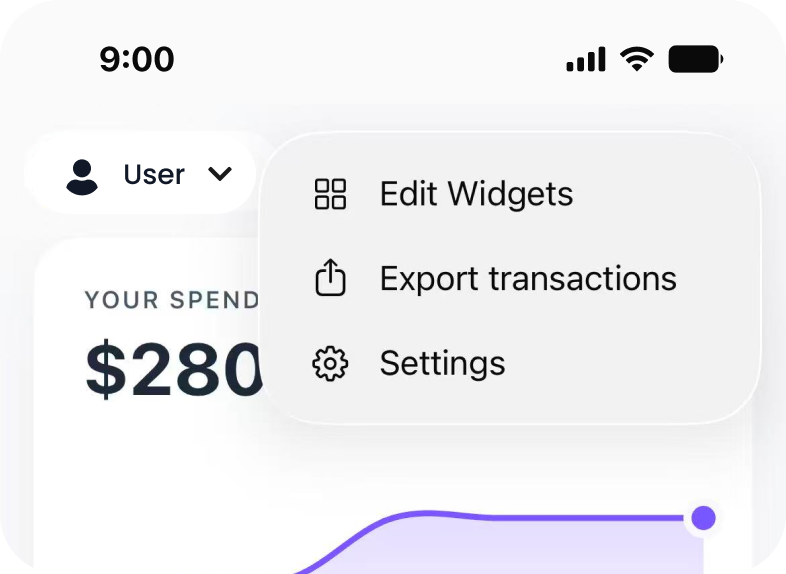
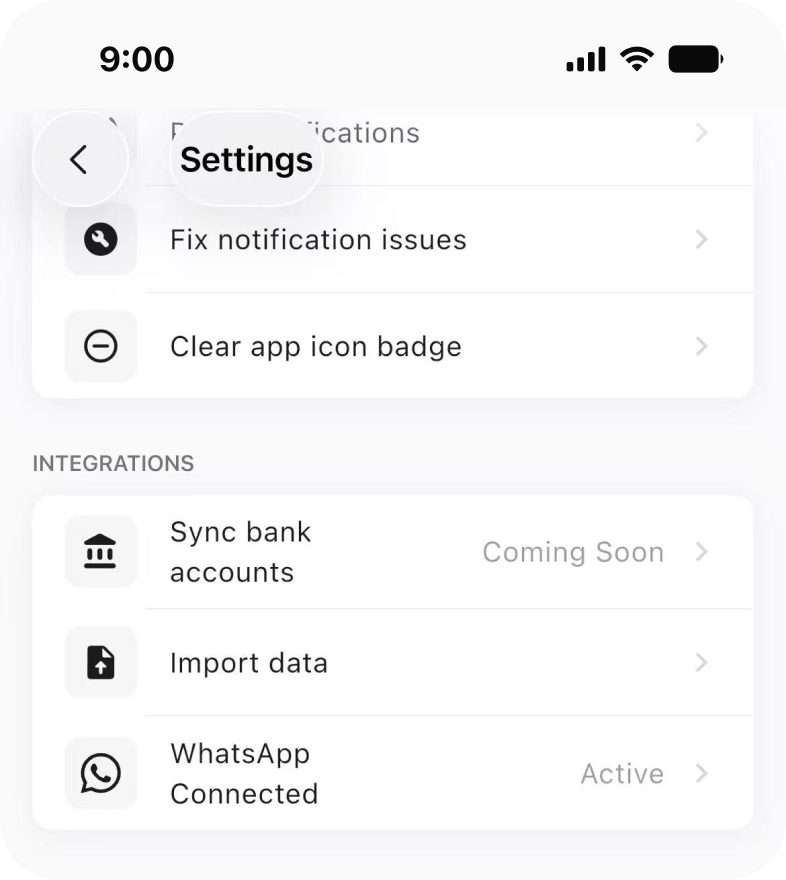
To set it up:
- Open Moneko.
- Tap the three dot menu in the top right.
- Go to Settings.
- Tap WhatsApp Connection or Telegram Connection.
- Follow the steps to connect.
Once connected, you can start chatting with Moneko directly.
Expected Result
After connecting WhatsApp or Telegram, you can send messages to Moneko from chat to track expenses and check your budget.
How to Log Expenses in Chat
To log an expense, send a short message like you normally would.
Examples:
- Lunch 18
- Dinner 42
- Taxi 25
- Rent 1200
Moneko will:
- detect the amount
- categorize the expense
- add it to the right Space
- update your budget
Expected Result
Your expense is logged from WhatsApp or Telegram without needing to open the app.
Best Practice
Keep your message simple and include the expense name and amount.
How to Log Shared Expenses in Chat
You can also split expenses directly from WhatsApp or Telegram.
Examples:
- Dinner 120 split
- Groceries 80 shared
- Dinner 120 with Alex
Moneko will:
- split the expense
- track who paid
- update balances
Everything stays in sync for your group.
Expected Result
The shared expense is logged, split, and reflected in your group balances.
Best Practice
Use words like split, shared, or include the person’s name when the expense involves someone else.
How to Send Receipts in Chat
You can upload a receipt photo directly in WhatsApp or Telegram.
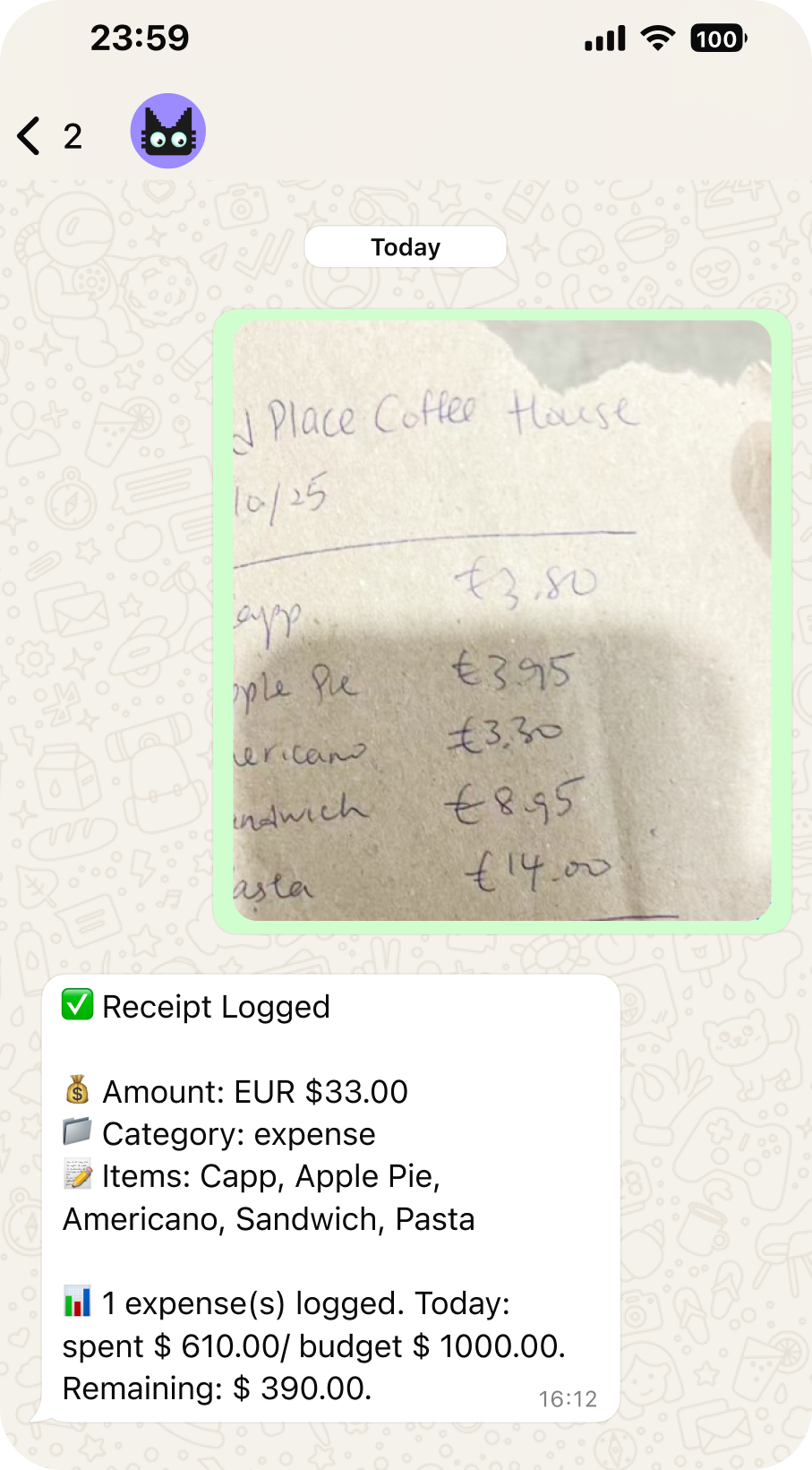
Moneko will extract details and attach the receipt to your expense.
This is useful when you are out and want to log something quickly before you forget.
Expected Result
The receipt is saved with your expense and available for easy reference later.
How to Add Recurring Expenses from Chat
You can set recurring payments by sending a message.
Examples:
- Rent 1200 monthly
- Gym 50 every month
- Netflix 14 monthly
Moneko creates a recurring item from the details you provide. A scheduled item is a forecast until its occurrence is confirmed; it is not automatically treated as completed spending.
Expected Result
The recurring item is added with the schedule you supplied. Confirm, skip, edit, or end occurrences from the recurring workflow as needed.
Best Practice
Include both the amount and repeat timing, such as monthly or every month.
How to Ask Simple Budget Questions in Chat
You can also check your spending from WhatsApp or Telegram.
Examples:
- How much did I spend this month
- How much left in groceries
- What is my total balance
Moneko will reply with a quick summary.
Expected Result
You can get budget or balance information directly in chat.
Troubleshooting Common Issues
I Cannot Log Expenses from WhatsApp or Telegram
Make sure you have connected the correct chat app in Moneko.
Go to:
Moneko → three dot menu → Settings → WhatsApp Connection or Telegram Connection
Then follow the connection steps again if needed.
Moneko Did Not Understand My Message
Try using a shorter message with a clear amount.
Examples:
- Lunch 18
- Taxi 25
- Groceries 80 shared
My Expense Was Added to the Wrong Space
Moneko adds the expense to the right Space based on your chat setup.
If something looks wrong, open Moneko and check which Space the expense was added to.
My Shared Expense Did Not Split Correctly
Use clear split words such as:
- split
- shared
Examples:
- Dinner 120 split
- Groceries 80 shared
My Recurring Expense Was Not Created
Make sure your message includes a repeat timing.
Examples:
- Rent 1200 monthly
- Gym 50 every month
I Cannot See My Receipt
Receipts are attached to expenses.
Check the related expense in Moneko after sending the receipt photo in chat.
Frequently Asked Questions
Yes. Connect WhatsApp in Moneko settings, then send messages to Moneko to log expenses.